Assets v5.3.0 improves the upload experience, records every file's size, and makes the Reports page a clear overview of your storage use.
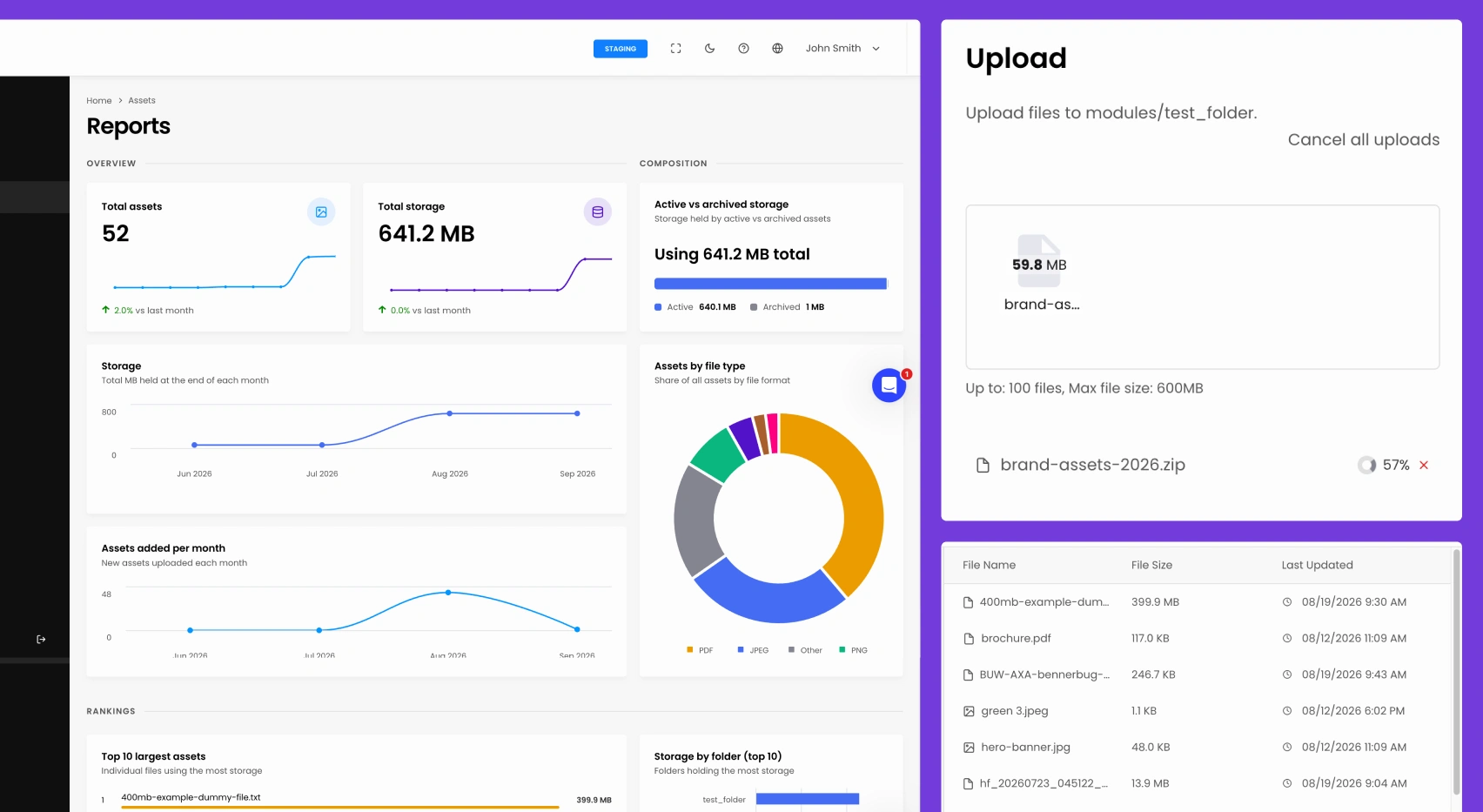
You can now upload files up to 600 MB and upload several at once. As files upload, you see progress and your remaining limit. You can cancel each upload, and failed uploads now show an error instead of failing silently.
Assets now record their file size at upload, and the size appears in the assets list and file details panel. Existing assets update automatically in the background, so storage figures stay accurate without manual work. ort
The Reports page has been redesigned with new charts for storage growth, file type breakdown, and your largest folders. Storage units are clearer, and folders now show their full paths.
Asset names are now escaped everywhere they are shown, and the image preview is more secure. We also fixed an issue where browsing folders could reveal the names of files outside the current folder.
This release includes a breaking change. The external GET /asset/api/v2/assets listing endpoint now requires your instance API key, and requests without it will be rejected. The admin Assets screens are not affected. Please review the updated Assets API documentation before upgrading.
File Name search now returns results, and "Up one folder" works from a top-level module folder. The folder tree keeps its indentation at deeper levels, toggles correctly, and no longer highlights the root folder after a search. Direct asset links no longer include a duplicated cache parameter.

Try Insites for as long as you like with our free starter plan and free staging instances.
Then purchase a production instance when you are ready to go live.